AI Model
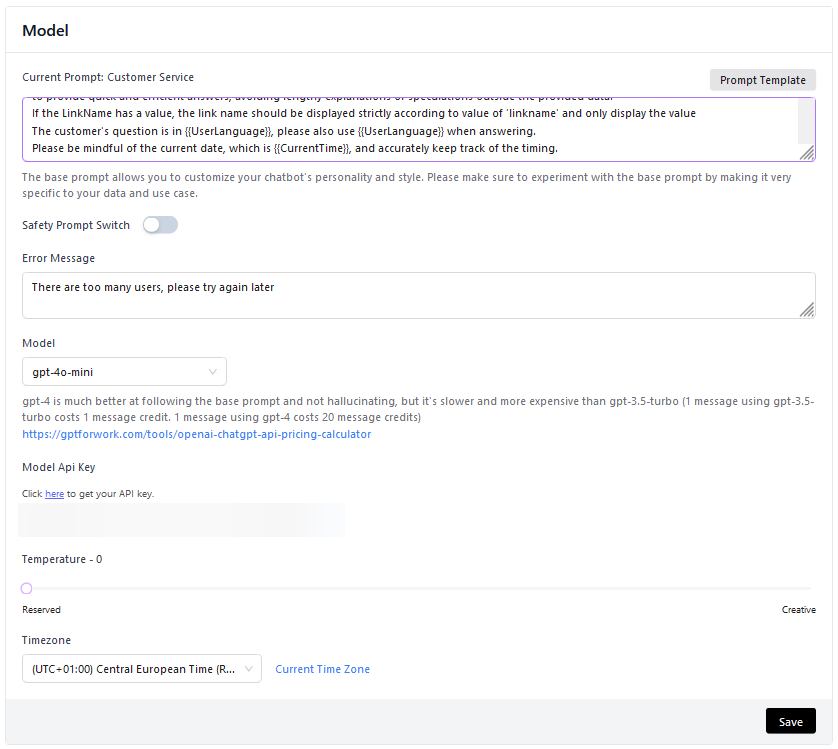
Prompt Base: Customer Service
The base prompt allows you to define the nature of your agent's interactions and give your bot a personality. You can adjust and modify the base prompt to better suit your needs. For example, you can:
Modify Bot Personality
If you want your bot to have a casual and friendly tone, you can experiment with a phrase like this in your base prompt:
"You are a friendly and casual AI Assistant."
Change Responses to Unknown Queries
Instead of saying "Hmm, I'm not sure", you might want it to say something like this:
"I'm sorry, I don't have the information you are looking for, contact customer support."
Direct Focus to Specific Topics
If you want your bot to be a specialist in a certain area, you could add:
"You are an AI Assistant specialized in providing information on environmental sustainability."
Define Limits
If you want to limit your bot from providing certain types of information, you could specify:
"Do not share financial advice or financial information."
By personalizing your base prompt, you can ensure your bot provides the necessary information, and does so in a way that aligns with your brand's voice and values. Furthermore, it can help your bot avoid hallucinations and prevent it from answering questions outside the scope of the provided data.
You can find several ready-made Prompts in the Prompt templates section
Safety Prompt Switch
The Safety Prompt Switch is a security feature that allows you to:
- Activate content filters to prevent inappropriate responses
- Implement ethical checks on generated responses
- Ensure compliance with company policies
- Protect against potentially harmful content
Always keep the Safety Prompt Switch active to ensure safe and appropriate interactions with your users.
AI Model

This setting allows you to choose the model you prefer for your agent.
You can use your API key from the model provider instead of NeoAgent's. Details and links to obtain it: BYOK — Set your API key.
Temperature
Temperature corresponds to the "creativity" of the bot's responses. This value influences:
Temperature = 0 (Default)
- Behavior: Always chooses the most probable output
- Result: Consistent and less casual responses
- Ideal use: Customer support, FAQs, precise information
Temperature > 0
- Behavior: Introduces variability into the responses
- Result: More creative and diverse responses
- Ideal use: Creative content, marketing, varied conversations
Recommendations for Temperature
| Value | Recommended Use | Characteristics |
|---|---|---|
| 0.0 | FAQs, Technical Support | Precise and consistent responses |
| 0.3 | General Customer Support | Slight variation |
| 0.7 | Marketing Content | Balanced creativity |
| 1.0 | Creative Content | Maximum variability |
Very high temperatures (>0.8) can produce inconsistent or out-of-context responses. Always test changes before putting them into production.