BYOK — Set up your API key
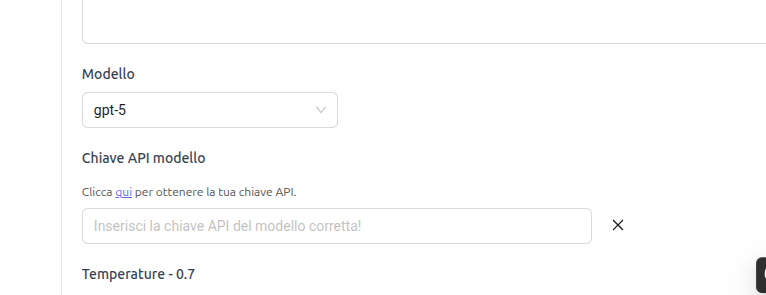
BYOK (Bring Your Own Key) means using your API key from an AI model provider instead of the one provided by NeoAgent. Configure it in General Settings → AI Model, under Model API Key.
What is an API key
An API key is a secret credential that authorizes access to an AI service. The provider uses it to:
- identify your account,
- bill consumption against your quota,
- apply the limits of your plan.
What is BYOK for
- Cost control: consumption is billed directly to your provider's account.
- Your quotas and limits: you use the tier and rate limits of your account.
- Specific models: access the models enabled on your key.
- Compliance: traffic to the provider follows your contract.
If you leave the field blank, NeoAgent uses its own key (platform credits).
Where to enter it
- Open your Chatbot → General Settings → AI Model.
- Select the Model (e.g.,
gpt-5). - In the Model API Key field, paste the key from the corresponding provider. The link "Click here to get your API key" opens the right portal.
- Save. With the X you remove the key and return to the NeoAgent key.
The key must belong to the same model provider as selected (e.g., OpenAI model → OpenAI key). A key from another provider will generate authentication errors.
Where to get the key
| Provider | Typical Models | Where to create the API key |
|---|---|---|
| OpenAI | GPT-5, GPT-Realtime | https://platform.openai.com/api-keys |
| Anthropic | Claude (Opus, Sonnet, Haiku) | https://console.anthropic.com/settings/keys |
| Gemini | https://aistudio.google.com/app/apikey | |
| xAI | Grok | https://console.x.ai/ |
| DeepSeek | DeepSeek Chat / Reasoner | https://platform.deepseek.com/api_keys |
| Mistral | Mistral | https://console.mistral.ai/api-keys/ |
For each provider: access the developer portal, create a new key, and copy it. For consumption models, you need an account with an active payment method.
Security
- The key is a secret: do not share it, do not commit it, do not paste it in chats.
- You can revoke it at any time from the provider's portal.
- Set spending limits on the provider to avoid unexpected costs.
- NeoAgent stores the key only to execute your agent's calls.
After saving, send a test message to the chatbot. If an authentication error appears, the key is incorrect or belongs to another provider.