Dashboard
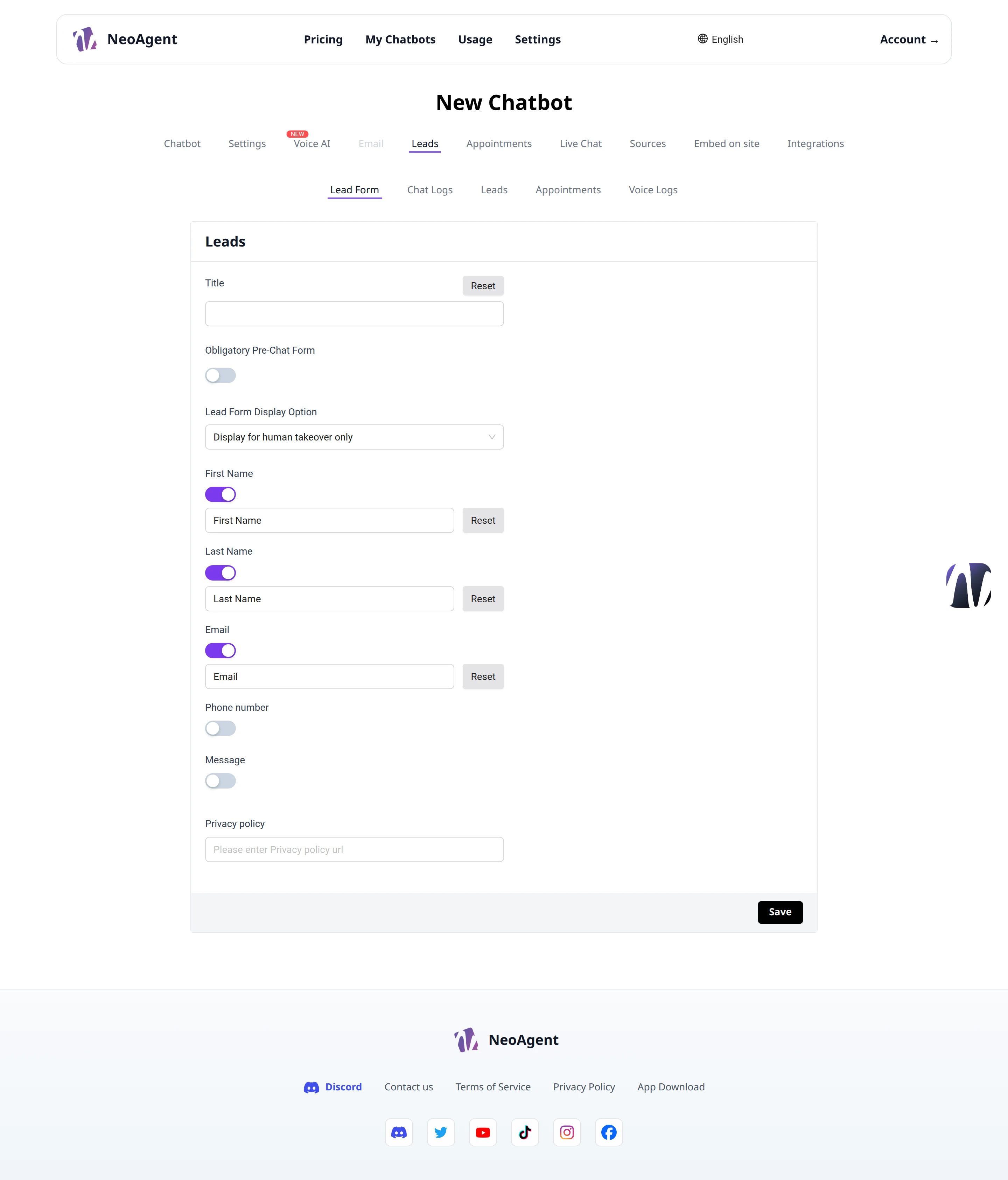
The Dashboard is the control panel for your chatbot: from here you manage the collected leads, consult conversation logs, and configure the form you use to capture visitor contact information.
Lead Management
At the top of the page, you will find the sub-sections dedicated to leads and activities generated by the chatbot:
- Lead Form — configure the contact collection form
- Chat Logs — view the history of conversations
- Leads — view the collected contacts
- Appointments — manage scheduled appointments
- Voice Logs — view the logs of voice calls
The available items depend on the features enabled on your chatbot (for example, Voice Logs only appear if you use the Voice AI functions).
Lead Form
The Lead Form section allows you to customize the form through which the chatbot collects visitor data.
You can configure:
- Title — the title displayed at the top of the form (with a Reset button to restore the default value)
- Obligatory Pre-Chat Form — enable the switch to make form completion mandatory before the chat begins
- Lead Form Display Option — choose when to display the form (e.g., Display for human takeover only, show it only when the visitor requests a human operator)
- First Name — enable/disable the first name field, customize the label with Reset
- Last Name — enable/disable the last name field, customize the label with Reset
- Email — enable/disable the email field, customize the label with Reset
- Phone number — enable/disable the phone number field
- Message — enable/disable the free message field
- Privacy policy — enter the URL of your Privacy Policy, displayed in the form
Saving
When you are finished, press Save to apply the changes. The Reset button reverts a single field to its default value.
Keep the field labels short and only request the data you truly need: a shorter form reduces visitor drop-off.
Embed on site
The Embed on site button in the top right allows you to access the code to embed the chatbot directly on your website.