AI Action (Flow Builder)
AI Actions allow you to integrate external APIs with your Neoagent chatbot, enabling advanced and customized functionalities through the Flow Builder.
A Professional account is required to use AI Actions. Please verify your subscription plan before proceeding.
Overview
AI Actions enable your chatbot to:
- Connect external APIs to extend capabilities
- Process complex data via external services
- Integrate CRM systems and databases
- Automate business-critical workflows
Configuration
1. Access Professional Account
Log in to your Professional account to access advanced AI Action features.
AI Actions are only available for Professional accounts. Please verify your subscription plan before proceeding.
2. Fill in API Information
Enter the necessary information for the API request:
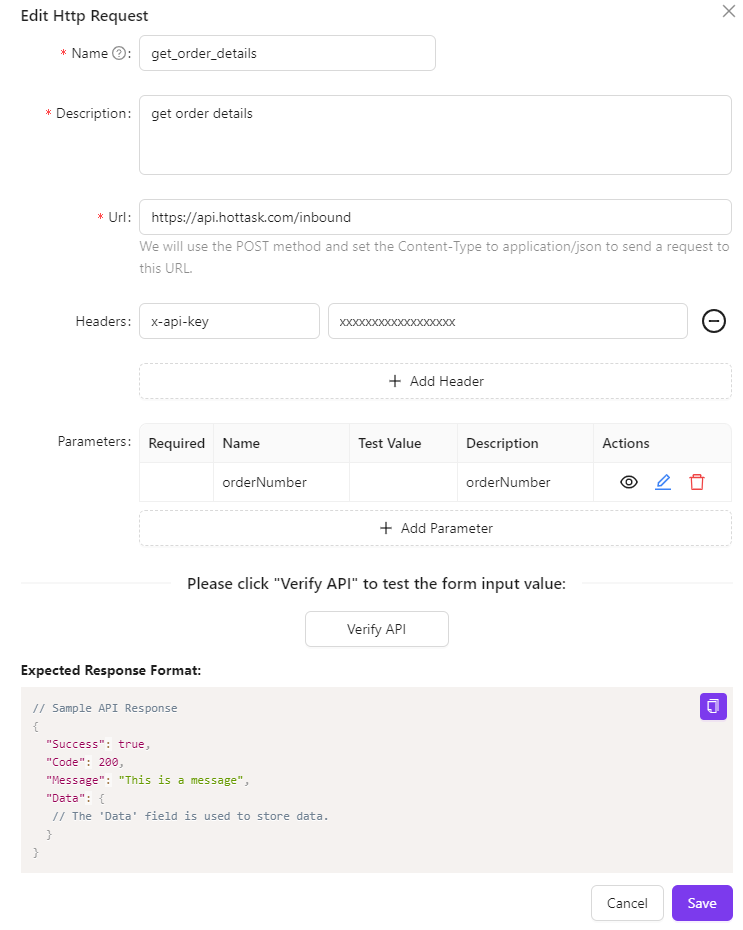
Elements to Configure:
- API URL: Endpoint of your external API
- Parameters: Data to send with the request
- Authentication: Credentials or access token
- HTTP Method: GET, POST, PUT, DELETE, etc.
API Response Format
Request Structure
The response from your API must follow this specific structure to be processed correctly:
{
  "Success": true,
  "Code": 200,
  "Message": "This is a message",
  "Data": {
    // The 'Data' field is used to store the data.
  }
}
Field Explanations:
- Success: Boolean indicating whether the request was processed successfully
- Code: HTTP status code of the response
- Message: Descriptive message of the result
- Data: Object containing the actual data of the response
The interface response must strictly follow the above structure to work correctly.
Verification and Testing
3. Verify API
Click the "Verify API" button to test the configuration. If the interface functions correctly and returns the expected response, the validation will pass.
✅ Automated Validation: The system will automatically check that your API responds in the correct format and that all parameters are configured properly.
4. Test GPT API Call
Test the GPT API call to ensure it works correctly:
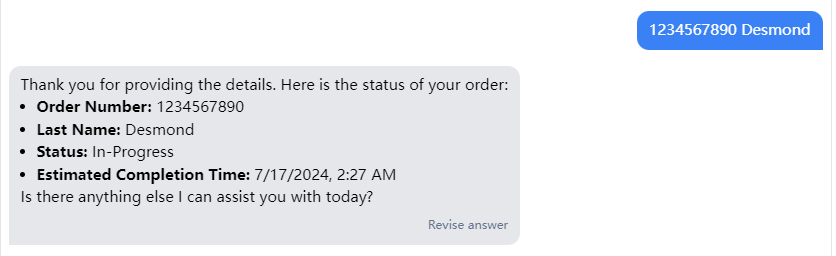
Complete Test: The test will verify the full integration between the AI chatbot and your external API, ensuring that data is exchanged correctly.
Use Cases for AI Actions
CRM Integration
Connect the chatbot to your CRM to create, update, and retrieve customer information.
Payment API
Integrate payment services to process transactions directly within the chat.
External Services
Connect third-party services such as calendars, booking systems, or databases.
Data Processing
Process and analyze complex data through machine learning APIs.
Best Practices
Security and Authentication
- ✅ Always use HTTPS for API calls.
- ✅ Implement robust authentication (API keys, OAuth, JWT).
- ✅ Do not expose sensitive credentials in URL parameters.
- ✅ Always validate input and output data.
Performance and Reliability
- ✅ Implement appropriate timeouts for API calls.
- ✅ Handle errors and provide fallback messages.
- ✅ Optimize responses to reduce latency.
- ✅ Test the API under load to verify scalability.
Integration Examples
Basic CRM Integration
{
  "Success": true,
  "Code": 200,
  "Message": "Customer found",
  "Data": {
    "customerId": "12345",
    "name": "Mario Rossi",
    "email": "mario@example.com",
    "phone": "+39123456789",
    "status": "active"
  }
}
Booking System Response
{
  "Success": true,
  "Code": 200,
  "Message": "Appointment booked",
  "Data": {
    "appointmentId": "apt_789",
    "date": "2024-01-15",
    "time": "14:30",
    "duration": 60,
    "status": "confirmed"
  }
}
Once properly configured, your AI Action will allow the chatbot to interact with external APIs, providing a richer user experience integrated with your business systems.